Every product makes a promise. Documentation is where you keep it.
When someone buys your software, signs up for your tool, or picks your product off a shelf, they are trusting that they can actually use it. Product documentation is what turns that trust into a working relationship. It is the guide, the answer, and the safety net all at once, and when it is missing, people notice fast.
Yet documentation is one of the most overlooked parts of building a product. Teams pour months into features and then explain them in a rushed help article written the night before launch. The result is confused users, a support inbox that never empties, and a product that is better than its reputation, because nobody can figure out how to use it.
This guide covers what product documentation actually is, the different types, real examples from companies doing it well, why it matters more than most teams realize, and how to create documentation that earns its place. Whether you are writing your first help article or rethinking your whole knowledge base, you will find a clear path here.
The short answer. Product documentation is the collection of guides, references, and instructional content that explains how a product works and how to use it. It includes internal documents that help teams build the product, like requirements and technical specs, and external documents that help customers use it, like user guides, tutorials, and knowledge bases. Good documentation improves the customer experience, reduces support tickets, and helps a product get adopted faster.
What Is Product Documentation?
Product documentation is any written or visual material that explains how a product works, how to build it, and how to use it. It is the recorded knowledge of a product, kept in a place where the people who need it can find it.
That covers a lot of ground, from a developer's API reference to a one-page guide showing a customer how to reset their password. What ties it all together is purpose. Every piece of product documentation exists to help someone understand or use the product without having to ask a person.
The Purpose of Product Documentation
At its core, documentation answers questions before they are asked. A customer wondering how a feature works, a developer trying to connect to your API, a new hire learning how the product is built, all of them have questions, and documentation is the scalable way to answer them.
Without it, that knowledge lives in people's heads and in scattered chat messages. Someone has to stop what they are doing and explain the same thing again. Documentation takes that knowledge out of people's heads and puts it somewhere everyone can reach, any time, without waiting.
Who Uses Product Documentation
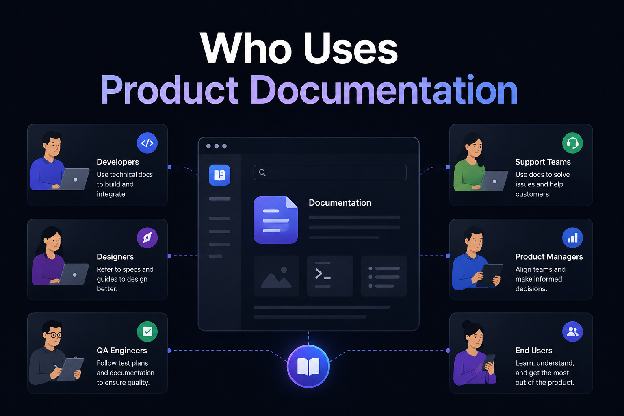
Two broad groups rely on it, and they need very different things.
- Your customers and users need to know how to use the product. They want guides, tutorials, answers to common questions, and help when something breaks.
- Your internal teams need to know how the product is built and why. Product managers, engineers, designers, and support staff all draw on documentation to do their jobs and stay on the same page.
This split between external and internal readers is the most important distinction in all of product documentation, and we will come back to it, because mixing the two up is one of the most common mistakes teams make.
Product Documentation Examples
To make it concrete, product documentation includes things like a getting-started guide for new users, an API reference for developers, a troubleshooting article for a common error, release notes announcing what changed in the latest version, and an internal requirements document describing what a feature should do. All of these are product documentation, just aimed at different readers with different needs.
Why Product Documentation Matters
It is easy to treat documentation as an afterthought. The data makes a strong case for treating it as core to the product instead.
It Improves the Customer Experience
People want to solve problems themselves. Around 59% of customers say they would rather use self-service to fix simple issues, and 91% say they would use a knowledge base if one were available and relevant to their needs.
Documentation is how you meet that preference. A customer who finds a clear answer in thirty seconds has a good experience. One who has to open a ticket and wait a day does not, even if your support team is excellent. There is a catch worth knowing, though. Expectations are high, and if self-service fails even once, many people do not try again. Around 41% of Gen Z and millennial customers give up on self-service when it fails them. So documentation does not just need to exist, it needs to actually work.
It Reduces Your Support Workload
This is where documentation pays for itself. Teams with mature self-service see 40% to 60% of routine questions deflected away from human agents.
The cost difference is dramatic. Analysis of over 100 support benchmarks found that a self-service contact costs about $1.84, while a contact handled by a human agent averages $13.50. That is roughly a sevenfold difference on every repetitive question your documentation answers instead of your support team.
Worth knowing. Adding more customers without self-service can mean 30% more support tickets. Adding those same customers when you have good documentation adds almost nothing to your support load. Documentation is what lets a product grow without your support costs growing at the same pace.
It Helps Teams Collaborate
Internally, documentation is how a team stays on the same page. When requirements, decisions, and technical details are written down, people stop relying on memory and hallway conversations. A new engineer can read how a system works instead of interrupting a senior one. A designer can check what a feature is supposed to do instead of guessing.
This matters more as a team grows. What one founder holds in their head does not transfer to ten employees. Documentation is how knowledge scales past the people who first created it.
It Accelerates Product Adoption
People adopt what they understand. A customer who can quickly learn how to use your product reaches value faster, and a customer who reaches value sticks around. Good onboarding documentation and clear guides shorten the distance between signing up and getting something useful done, which is the moment adoption really begins.
Types of Product Documentation
Product documentation splits into two families, internal and external. Getting familiar with both helps you see what your product might be missing.
Internal Product Documentation
Internal documentation is written for the people building the product. Customers never see it. Its job is to keep teams on the same page and preserve the reasoning behind what gets built.
- Product Requirements Document (PRD). A PRD describes what a product or feature should do, who it is for, and what problem it solves. It is the reference point that keeps everyone building the same thing.
- Product Roadmap. A roadmap lays out what the team plans to build and roughly when. It communicates direction and priorities across the whole company.
- Technical Documentation. This covers how the product works under the hood, its architecture, systems, and the decisions behind them, so engineers can build and maintain it.
- API Documentation. If your product has an API, this explains how developers connect to it, what each endpoint does, and how to use it. It sits on the line between internal and external, since your own team and outside developers both rely on it.
- Design Documentation. UX specifications, user flows, and design decisions that tell the team how the product should look and behave.
- Release Notes. A record of what changed in each version, new features, improvements, and fixes. Internal teams use them to track progress, and a customer-facing version keeps users informed too.
External Product Documentation
External documentation is written for the people using the product. This is what most people picture when they think of product documentation, and it is usually public.
- User Guides. Step-by-step instructions showing customers how to use features and complete tasks. The backbone of most help content.
- Knowledge Base. A searchable library of articles covering how the product works, organized so people can find answers on their own. Often the home for everything else on this list.
- Tutorials. Guided walkthroughs that teach a customer how to achieve a specific outcome, usually aimed at getting new users to their first success.
- FAQs. Short answers to the questions customers ask most, giving people the quickest possible path to a common answer.
- Troubleshooting Guides. Help for when something goes wrong, walking customers through common problems and how to fix them.
Internal vs External Documentation
Here is how the two families compare at a glance.
| Internal Documentation | External Documentation | |
|---|---|---|
| Written for | Teams building the product | Customers using the product |
| Audience | Product, engineering, design, support | Users, developers, buyers |
| Visibility | Private | Usually public |
| Examples | PRD, roadmap, technical specs, design docs | User guides, knowledge base, tutorials, FAQs |
| Main goal | Keep teams in sync and preserve knowledge | Help customers succeed on their own |
Follow Product Documentation Through the Product Lifecycle
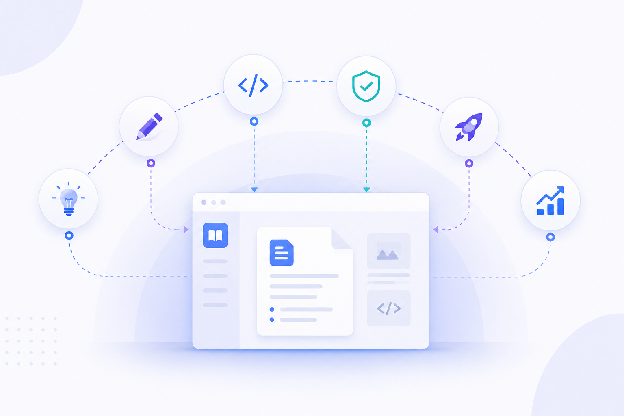
One of the clearest ways to understand product documentation is to see where each type shows up as a product moves from idea to growth. Documentation is not a single stage at the end. It runs the whole way through.
| Stage | Documentation Produced |
|---|---|
| Planning | Product vision, PRD |
| Design | UX specifications, user flows |
| Development | Technical documentation, API docs |
| Testing | QA documentation, test cases |
| Launch | User guides, release notes |
| Growth | FAQs, knowledge base articles |
Seen this way, documentation is less a task and more a thread that runs through the entire life of a product. Each stage produces knowledge worth keeping, and the teams that capture it as they go end up with far richer documentation than those who try to write it all at the end.
Create Product Documentation Step by Step
Good documentation follows a repeatable process. Here is how to approach it, whether you are starting from nothing or filling gaps.
Identify Your Audience
Start by deciding who you are writing for. A developer connecting to your API and a first-time customer setting up their account need completely different things. Every choice after this, the depth, the tone, the examples, follows from knowing your reader. Write for one audience per document.
Choose the Documentation Type
Match the format to the need. A common how-to becomes a user guide. A repeated question becomes an FAQ entry. A complex first-time setup becomes a tutorial. Picking the right type means people find the answer in the shape they expect.
Organize the Content
Plan the structure before you write. Group related topics, decide on a logical order, and map how someone will move through your documentation. A clear structure is what separates a knowledge base people can actually use from a pile of articles nobody can find their way through.
Write Clearly
Lead with the answer, then explain. Use short sentences and plain words. Break instructions into numbered steps. Assume your reader is smart but busy, and skip the padding. The goal is for someone to read as little as possible and still succeed.
Add Visuals
Screenshots, diagrams, and short videos do work that text cannot. A picture of the exact button someone needs to click beats three paragraphs describing it. Visuals also break up walls of text and make documentation less intimidating to start reading.
Publish and Maintain
Publish somewhere people can search and reach easily, then keep it current. Documentation is not finished at publish. It needs updating every time the product changes, which brings us to the habits that keep documentation useful over time.
Product Documentation Best Practices
A few principles separate documentation that helps from documentation that gathers dust.
- Write for one audience. A single document trying to serve developers and first-time users serves neither. Split them.
- Keep documentation searchable. Most people do not read documentation top to bottom. They search for one thing. If your search is weak or your titles are vague, good content stays hidden.
- Use a consistent structure. When every article follows a familiar pattern, people learn how to read your documentation once and apply it everywhere. Consistency reduces the effort of finding answers.
- Keep content up to date. Outdated documentation is worse than none, because it teaches people your docs cannot be trusted. Review content whenever the product changes.
- Assign ownership. Documentation without an owner rots. Someone needs to be responsible for keeping each area accurate, or it quietly drifts out of date.
- Measure documentation performance. Track which articles get read, which ones actually help, and which questions still reach support. The data tells you where to improve.
Worth knowing. Only about one in five companies rate their own knowledge base as very accurate. Accuracy is where most documentation quietly fails, so a regular review schedule is one of the highest-value habits a team can build.
Avoid Common Product Documentation Mistakes
Knowing what goes wrong is as useful as knowing what to do. These are the mistakes that show up again and again.
- Mixing customer and internal documentation. Putting commission structures, internal decisions, or technical debt notes in the same place customers look creates confusion and can expose things you would rather keep private. Keep the two families separate.
- Outdated content. The most common failure. A feature changes, the doc does not, and now your documentation is actively misleading people.
- Poor navigation. If people cannot find the article, it does not matter how good it is. Weak search and confusing structure hide your best work.
- Writing for everyone. Documentation that tries to speak to beginners and experts at once ends up frustrating both. Pick a reader.
- No ownership or review process. Without someone responsible for keeping it current, documentation decays by default. This is the root cause behind most of the other mistakes.
Learn From Great Product Documentation Examples
The best way to understand good documentation is to look at companies known for it.
- Stripe. Widely considered the gold standard for developer documentation. Stripe's docs are clear, well-organized, full of working code examples, and genuinely pleasant to use, which is part of why developers recommend the product.
- Notion. Notion pairs a searchable help center with tutorials and templates, making a flexible and complex product approachable for people who are not technical.
- GitHub Docs. GitHub covers an enormous range of features for very different skill levels, from first-time users to advanced developers, and organizes it so each audience can find their level.
- Apple Support. Apple's support content is built for a mass, non-technical audience, using plain language and clear visuals to make complex devices feel simple.
The common thread is not fancy design. It is clarity, structure, and a clear sense of who each page is written for.
Choose the Best Product Documentation Tools
The right tool depends on who is writing your documentation and where it needs to live. Here is how some of the most common options compare.
| Tool | Best for | Approach | Notable strength |
|---|---|---|---|
| FlyDocs | Teams without a docs team | Hosted, AI-native, no code | Visual editor plus AI writing, publishes a beautiful site instantly |
| weDocs | WordPress users | WordPress plugin | Documentation hosted on your own WordPress site |
| Notion | Internal docs and wikis | All-in-one workspace | Flexible for notes, docs, and collaboration in one place |
| Confluence | Large teams | Team workspace | Deep integration with the Atlassian and Jira ecosystem |
| GitBook | Developer docs | Docs platform | Strong for technical and API documentation |
| Document360 | Dedicated knowledge bases | Knowledge base platform | Purpose-built knowledge base features |
The main question to ask is who writes your documentation. If it is developers comfortable with markdown, a developer-focused tool fits. If it is product, marketing, or support people who just want to write and publish without code, a tool like FlyDocs is built for exactly that, a visual editor and AI writing assistant that turn rough notes into a polished, published docs site without touching code.
Frequently Asked Questions
What is product documentation?
Product documentation is the collection of guides, references, and instructional content that explains how a product works and how to use it. It includes internal documents that help teams build the product and external documents that help customers use it, such as user guides, tutorials, and knowledge base articles.
What should product documentation include?
It depends on the audience. Customer-facing documentation usually includes getting-started guides, user guides, tutorials, FAQs, and troubleshooting articles. Internal documentation usually includes a product requirements document, a roadmap, technical and API documentation, and design specs.
Who creates product documentation?
It varies by company. Technical writers, product managers, developers, designers, and support teams all commonly contribute. In smaller companies, the same people who build the product often write the documentation. The key is that someone owns each area and keeps it current.
What is the difference between product documentation and technical documentation?
Technical documentation is one type of product documentation. Product documentation is the broad category covering everything that explains a product, while technical documentation refers specifically to the material describing how the product works under the hood, such as architecture, systems, and APIs.
What is the difference between a knowledge base and product documentation?
A knowledge base is one format of product documentation. Product documentation is the full range of content explaining a product, while a knowledge base is specifically a searchable library of articles, usually customer-facing, that often houses user guides, FAQs, and troubleshooting content in one place.
When should product documentation be updated?
Every time the product changes. Any new feature, changed workflow, or updated pricing should trigger a documentation update. Beyond that, a regular review schedule helps catch anything that slipped through, since outdated documentation is worse than having none at all.
What tools are best for product documentation?
The best tool depends on who writes your docs and where they should live. WordPress users often choose weDocs, developers lean toward GitBook, and large teams use Confluence. Teams that want to write and publish without code, including non-technical writers, are the target audience for AI-native tools like FlyDocs.
Can AI help create product documentation?
Yes. AI can draft articles from rough notes, rewrite and simplify existing content, translate documentation into other languages, and even turn screenshots into structured guides. The human role shifts toward reviewing and verifying, since AI-generated content still needs a person to confirm it is accurate. Tools like FlyDocs build AI writing directly into the documentation workflow.
Turn Your Product Knowledge Into Documentation That Works
Product documentation is not paperwork. It is the bridge between the product you built and the people trying to use it. Done well, it makes customers happier, cuts your support load, keeps your team in sync, and helps your product get adopted faster. Done badly, or not at all, it quietly holds back a product that deserves better.
The key takeaways are simple. Documentation comes in two families, internal for your team and external for your customers, and mixing them up causes most of the trouble. It runs through the entire product lifecycle, not just the end. And it only stays useful when someone owns it and keeps it current.
Most of all, documentation is a long-term investment. The article you write once can answer the same question thousands of times, for years, without you lifting a finger again. Few things you build return value that reliably.
If you are ready to build documentation without wrestling with code or markdown, FlyDocs lets anyone on your team write, customize, and publish a beautiful docs site with AI built in. Your next doc is ten minutes away.
Start freeThanks for reading the FlyDocs blog! Stay tuned for more guides and updates soon. 🚀✨